From a Morning Question to Open-Source Tool
On the Synapse platforms I build for clients, every morning starts with the same question: did everything run overnight? Most days it did. When a pipeline fails, though, it usually fails quietly. Nobody notices until a dashboard shows the wrong numbers or a report arrives late, and by then you're explaining a gap rather than catching a problem.
For teams in regulated industries - defense, aviation, healthcare, education - there's a second question that follows close behind: can you prove you were watching? An auditor wants evidence, not reassurance.
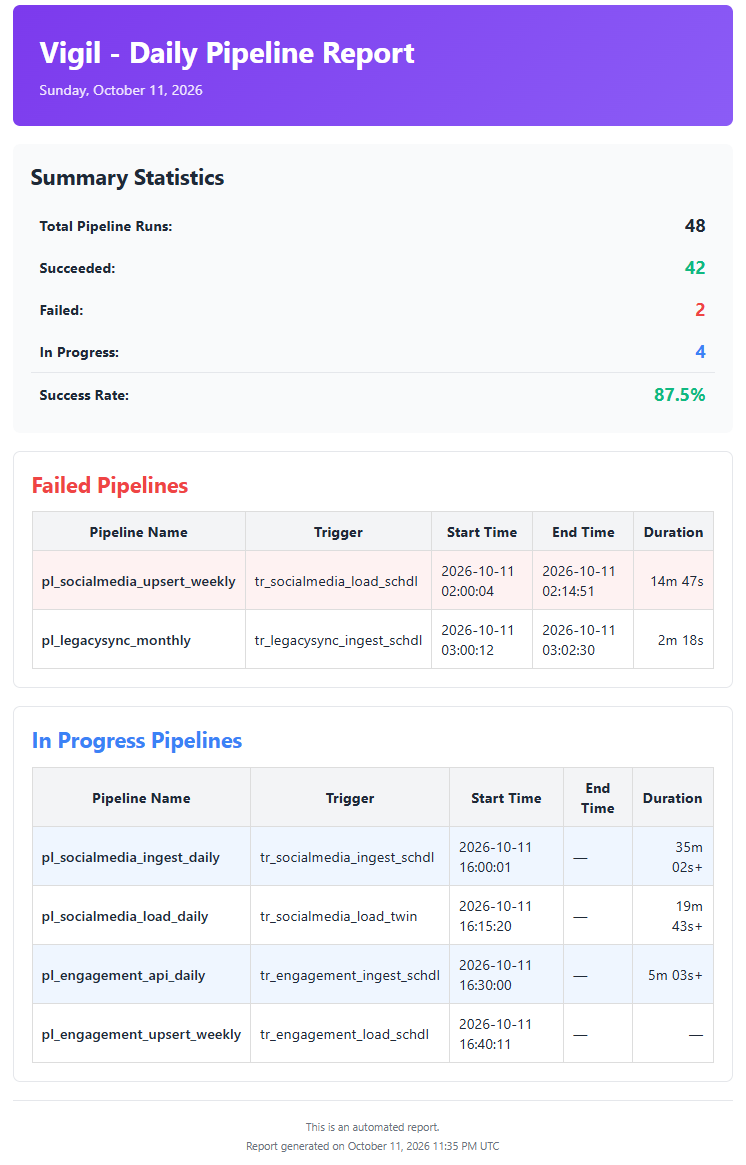
That is why I built Vigil: a free, open-source Azure Function that checks your Synapse pipelines every morning, emails a structured health summary to your team, and keeps a timestamped record of every run. We built it for our own client platforms, and we run it on the ones we deliver.
Vigil is available on GitHub: github.com/AtLongLastAnalytics/vigil
The Problem Vigil Solves
Azure Synapse tells you a lot about a pipeline run if you go and look. The trouble is that someone has to go and look, every day, and nobody keeps a consistent record of what they saw.
Most teams end up somewhere in between: an alert on failures, a colleague who checks the monitoring hub when they remember, and no history of what ran and when. If you've read the maturity ladder of data pipeline monitoring, this is the gap between the first rungs and audit-ready evidence.
Vigil closes that gap with two things:
- A daily summary of every run - successes included - so the team starts the day knowing exactly where things stand.
- A timestamped CSV snapshot of each day's runs, building a durable evidence trail you can keep for audits.
Who It Is For
Data Platform Operations Teams - Get a daily, timestamped summary of pipeline health without building custom monitoring infrastructure from scratch.
Synapse Workspace Owners - Track failed runs quickly with run IDs and durations, so on-call engineers can move directly from alert to action.
Compliance-Driven Data Teams - Produce timestamped daily CSV snapshots and structured logs you can keep as an audit record.
How It Works
Vigil is built entirely on Azure services your team already trusts, so there's nothing new to secure:
- Deploy once into your tenant - Vigil runs as an Azure Function inside your own Azure environment. It authenticates with managed identity, so there are no secrets to store or rotate.
- It checks Synapse on a schedule - On a timer, Vigil pulls the last day's pipeline runs from your Synapse workspace: statuses, run IDs, and durations.
- You get a summary every morning - Vigil emails a structured HTML health report through Azure Communication Services to your chosen recipients: what succeeded, what failed, and the detail on-call needs to act.
- Every run is archived - Each run writes a timestamped CSV snapshot to storage, so you build up a day-by-day record over time.
Because Vigil uses managed identity in Azure and your Azure CLI login locally, the same code runs in development and production without credential changes.
Why Not Just Use Azure Monitor Alerts?
Azure Monitor alerts are good at one thing: telling you when something fails. Vigil is built for a different job. It reports on every run, successes included, and it keeps a record of each day. That means you can show an auditor you were watching every day - not just that you got paged on the bad ones.
The two work well together. Alerts get you out of bed; Vigil's daily summary and archive give you the full picture and the paper trail.
What You Need
You'll need three Azure resources: a Synapse workspace, an Azure Communication Services email resource, and a storage account. Locally, you need Python 3.12+, uv, the Azure CLI, and Azure Functions Core Tools.
Getting your first report takes under 20 minutes:
# 1. Clone and install dependenciesgit clone https://github.com/AtLongLastAnalytics/vigil.gitcd vigiluv sync --group devcp local.settings.json.example local.settings.json# Fill SYNAPSE_ENDPOINT, ACS_ENDPOINT, SENDER_ADDRESS, RECIPIENT_ADDRESSES# 2. Authenticate and run locallyaz loginfunc start
Current Limitations
Vigil is deliberately focused. Today it monitors Azure Synapse pipelines only (not Azure Data Factory or Microsoft Fabric), and email is the only alert channel. If you need incident tooling like PagerDuty or Opsgenie, multi-workspace reporting, or deployment hardening for a regulated environment, those are the customizations we build for clients.
Why Open Source
Like VISaR, Vigil is open source because the problem is a shared one. Every team running Synapse in production needs to know what ran overnight, and every team in a regulated environment needs to prove it. Making Vigil free means any organization can run it without procurement overhead, and contributors can extend it for their own contexts.
If Vigil is useful to you, I'd welcome feedback, issues, and pull requests on GitHub.
Vigil is free and open-source under the Apache 2.0 license. Contributions welcome.