A data platform isn't a concept. It's a collection of jobs that run in sequence, hand data to each other across layer boundaries, and either hold together under operational pressure or quietly fall apart. What matters day to day is what actually executes, in what order, and whether each piece is doing the job it was designed for.
This article is a walkthrough of a production platform I've built and operated for aviation and defense clients, covering the full solution from raw source data to Power BI report and why each layer is built the way it is. If you want the broader platform picture first, this article covers the full architecture. This one is about what actually runs at each layer and why.
The shape of it
Before going layer by layer, it's worth naming the full chain so the rest of this makes sense.
Data arrives from external SQL Server databases, APIs, SFTP drops, and internal ADLS sources. A Synapse notebook handles ingestion and lands raw data into the raw layer in ADLS. Another notebook picks up from raw and writes cleansed, conformed data to curated, also in ADLS. A Copy Activity then moves that curated data into a staging table in a dedicated Synapse SQL pool. A stored procedure runs from there, executing the MERGE logic that loads fact and dimension tables in the serve layer. Views sit on top of those serve tables. Power BI connects to the views.
That's the chain. Everything that follows is an explanation of why each step is what it is.
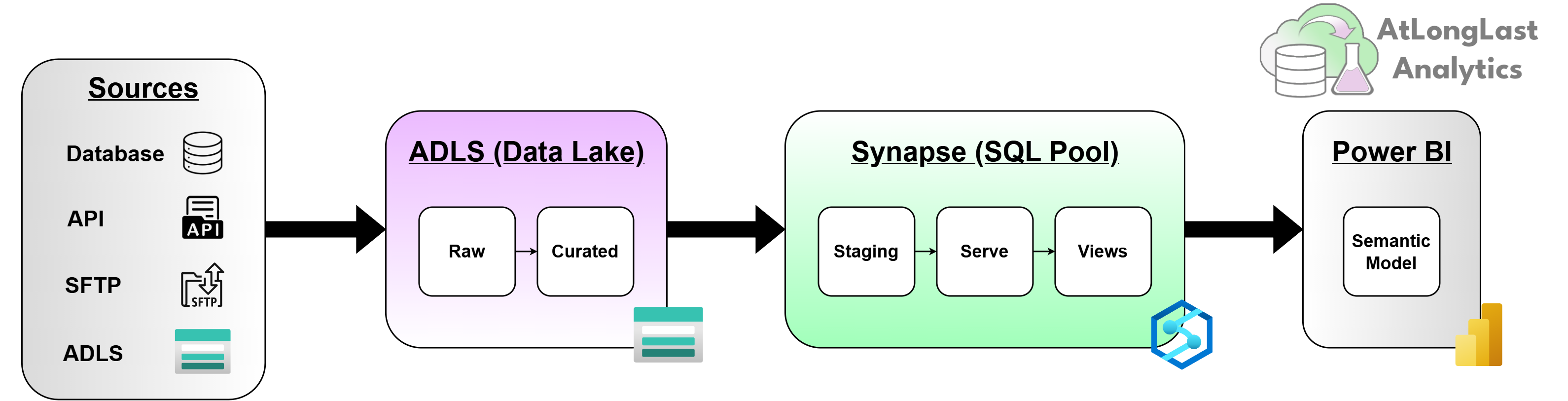
Fig. 1End-to-end data flow. Source systems through ingestion, raw, curated, staging, serve, views, and out to Power BI semantic model.
Ingestion: where notebooks earn their place
The ingestion layer is where the platform first meets the outside world, and the outside world is rarely cooperative with what you need.
Database sources lock rows, time out under load, and change schema without warning when someone else owns the maintenance window. APIs rate-limit without warning. They change response schemas between releases and don't always tell you. SFTP sources drop files on loose schedules with naming conventions that shift unannounced. Internal ADLS drops arrive from partner pipelines with their own assumptions about format and frequency that may not be documented anywhere findable.
Notebooks are the right tool here because the problems are programmatic. You need retry logic, schema validation, error handling that can deal with a partially malformed payload without taking down the whole run. You need to be able to inspect what came in, log what it looked like, and make decisions in code. A pipeline activity can't do that and a stored procedure has nothing to work on yet because the data hasn't landed.
There's one ingestion variant worth calling out specifically. Some SFTP-delivered data arrives encrypted. The notebook retrieves the decryption key from Key Vault using Managed Identity before any other step, decrypts the file in memory, and only then writes to raw. The security foundations underpinning this, including Managed Identity, Key Vault access policies, and ADLS access controls, are covered in detail in this earlier post. Nothing else in the platform ever touches the encrypted payload. The implication is that raw, for these sources, contains sensitive decrypted content - which means raw access controls need to be as tight as production, not treated as a temporary scratch space.
The rule across all source types: ingestion's only job is to land the data exactly as received. No transformation. No business logic. Raw is an audit record, not a staging area. If you need to reprocess from source, Raw is what you go back to.
Raw to Curated: Notebooks again, for different reasons
The Raw-to-Curated notebook is doing fundamentally different work from the ingestion notebook, even though it's the same tool.
Ingestion is about landing data reliably. Raw-to-Curated is about making it usable. That means parsing nested JSON, standardizing field names, enforcing data types, handling the schema drift that upstream providers introduce without notice. It also means applying data quality checks: what gets flagged, what gets rejected, what passes with a warning attached.
Notebooks are still the right tool at this stage because the data is still in ADLS, not yet in SQL tables. The transformations need code-level flexibility, you're working with files, not tables, and the logic can be complex enough that a SQL stored procedure would be the wrong abstraction even if it could reach the data.
What Curated looks like at the end of this step: validated, conformed, partitioned Parquet in ADLS. One row means one thing and you know what it is. The schema is stable. The naming is consistent. Curated is where the data becomes trustworthy enough to model against.
The Synapse pipeline orchestrates both the ingestion notebook and the Raw-to-Curated notebook, with dependency gates between them. The Raw-to-Curated notebook doesn't run until ingestion has completed successfully. This sounds obvious, but it matters operationally: without the gate, a partial Raw write can trigger a Curated run that processes incomplete data silently. That category of failure is far harder to catch than a job that simply didn't run.
Curated to Serve: where the handoff happens
This is the stage most architecture diagrams misrepresent most severely. They show a single arrow from Curated to Serve. The reality is three distinct steps, each with a different tool, and the choice of tool at each step is deliberate.
A Synapse Copy Activity moves the data from ADLS into a staging table in the dedicated SQL pool. This is not a transformation step. Copy Activity is a bulk move, it doesn't apply business logic and it doesn't know what the data means. It simply moves data stored in Parquet files from ADLS into a SQL table efficiently, and that's what you want from it. Using a notebook for this is unnecessary overhead.
The staging table is a flat landing zone. It has no constraints, no indexes, no foreign keys. Its only job is to hold the Curated data inside the SQL engine so the stored procedure can work on it. Whether you need a staging table at all depends on your volume and transformation complexity, for simpler loads you can copy directly from the Parquet files into the SQL table. But for data flows that have meaningful transformation logic in the stored procedure, the staging table is worth keeping: it makes the stored procedure's input predictable and gives you somewhere clean to inspect when something goes wrong.
The stored procedure does the actual load. It reads from staging, executes MERGE logic against the fact and dimension tables, and writes to the Serve tables. This is where the business logic lives: surrogate key lookups, SCD handling, upsert guards, transactional consistency across related tables.
Stored procedures are the right tool here because this is set-based SQL work running inside a database engine. They're fast at it. They're transactional. When they fail, they fail with a clear error at a specific line. You can run them manually to test, inspect the staging data before and after, and trace exactly what happened. A notebook doing this job is slower, harder to debug, and adds Spark cluster overhead to what is fundamentally a SQL problem.
Serve tables are the stable source of truth for the business. Schema changes here are a conversation, not a commit pushed under deadline pressure. The whole point of the layers below is to absorb the variability of the outside world so that Serve stays predictable.
Views: the contract between Serve and Power BI
Power BI doesn't connect to Serve tables directly. It connects to views that sit on top of them.
This is a deliberate design decision, and one worth being explicit about because it's easy to skip when you're moving fast. Direct table access from Power BI creates a tight coupling between the physical model and the semantic model. Refactoring a Serve table (rename a column, split a table, change a data type) can break reports. With views as the intermediate layer, you can refactor underneath without touching a single dataset, as long as the view contract stays stable.
Views also serve as a security boundary. Column-level control over exactly what Power BI can see, independent of what's in the underlying Serve table. Sensitive columns that exist for internal processing don't have to be exposed to the semantic model. You grant Power BI access to the views, not to the tables.
The modeling line sits here too. Some logic belongs in SQL, in the views or in the Serve layer below them: joins, filtering, column renaming, light aggregation. Some logic belongs in the Power BI semantic model: calculated measures, time intelligence, KPIs that need to react to slicer selections. Getting that line right matters for performance and maintainability. Views aren't a dumping ground for complex DAX work that should be pre-computed, and the semantic model isn't where you do joins that should have been done in SQL.
Import versus DirectQuery is the last decision in this layer, and in a high-volume operational aviation context it's a genuine trade-off. Import is faster and more stable for large datasets, but the refresh cadence creates a lag between what's in Serve and what's in the report. DirectQuery removes that lag but adds query load on the dedicated SQL pool during report interactions. Most of the time, Import with a well-timed refresh schedule is the right answer. The cases where DirectQuery earns its overhead are the ones where operational decisions depend on data that's minutes, not hours, old.
What it looks like on a bad day
On a good day, the platform is invisible. Notebooks run on schedule, stored procedures fire, semantic models refresh, and the people relying on operational reports never think about any of it.
On a bad day, it's a database that timed out under load, an API that quietly changed its payload structure, or a stored procedure that ran successfully but produced subtly wrong numbers because an upstream assumption no longer held. None of those show up as a system being down - they show up as numbers that look slightly off to someone who knows what they should look like. Catching them requires monitoring that goes beyond "did the job run?" to "did the data arrive, and does it look right?"
The dependency gates help here. A stored procedure firing on an incomplete curated write produces wrong numbers confidently. A gate that blocks that run produces no numbers at all - which is more visible, and easier to diagnose.
Final thoughts
The stack described here - notebooks for ingestion and Raw-to-Curated, Copy Activity for the ADLS-to-SQL pool step, stored procedures for the Serve load, views as the Power BI contract, isn't the only way to build this. But it's a stack where each tool is doing the job it was designed for, the failure modes are mostly visible, and a small team can keep it running without heroics.
The layered data architecture is sound. What matters operationally is what executes at each boundary, and whether the boundaries are actually enforced. Layers that bleed into each other, tools used outside their design envelope, and logic that lives in three places at once - that's where platforms become fragile and expensive to change.
If you're building or operating something with this architecture, or trying to work out where yours is straining under load, I'm happy to talk through it.